

Selling to customers around the world can increase the reach of your business. The problem comes when you need to support them in their language. If you're not a linguist this becomes a lot of work.
With our automatic machine translations, you can send an article off to be translated and get back an accurate translation in seconds. This saves having to get a third party involved and you can delay picking up that language dictionary a little longer 🤫
🌐 Supported language list
We use neural machine translation to give you the best possible quality. You can translate to and from any of these languages:
Language Name | Language Code |
Afrikaans | af |
Albanian | sq |
Amharic | am |
Arabic | ar |
Armenian | hy |
Azerbaijani | az |
Basque | eu |
Belarusian | be |
Bengali | bn |
Bosnian | bs |
Bulgarian | bg |
Catalan | ca |
Cebuano | ceb (ISO-639-2) |
Chinese (Simplified) | zh-CN (BCP-47) |
Chinese (Traditional) | zh-TW (BCP-47) |
Corsican | co |
Croatian | hr |
Czech | cs |
Danish | da |
Dutch | nl |
English | en |
Esperanto | eo |
Estonian | et |
Finnish | fi |
French | fr |
Frisian | fy |
Galician | gl |
Georgian | ka |
German | de |
Greek | el |
Gujarati | gu |
Haitian Creole | ht |
Hausa | ha |
Hawaiian | haw (ISO-639-2) |
Hebrew | he |
Hindi | hi |
Hmong | hmn (ISO-639-2) |
Hungarian | hu |
Icelandic | is |
Igbo | ig |
Indonesian | id |
Irish | ga |
Italian | it |
Japanese | ja |
Javanese | jw |
Kannada | kn |
Kazakh | kk |
Khmer | km |
Korean | ko |
Kurdish | ku |
Kyrgyz | ky |
Lao | lo |
Latin | la |
Latvian | lv |
Lithuanian | lt |
Luxembourgish | lb |
Macedonian | mk |
Malagasy | mg |
Malay | ms |
Malayalam | ml |
Maltese | mt |
Maori | mi |
Marathi | mr |
Mongolian | mn |
Myanmar (Burmese) | my |
Nepali | ne |
Norwegian | no |
Nyanja (Chichewa) | ny |
Pashto | ps |
Persian | fa |
Polish | pl |
Portuguese (Portugal, Brazil) | pt |
Punjabi | pa |
Romanian | ro |
Russian | ru |
Samoan | sm |
Scots Gaelic | gd |
Serbian | sr |
Sesotho | st |
Shona | sn |
Sindhi | sd |
Sinhala (Sinhalese) | si |
Slovak | sk |
Slovenian | sl |
Somali | so |
Spanish | es |
Sundanese | su |
Swahili | sw |
Swedish | sv |
Tagalog (Filipino) | tl |
Tajik | tg |
Tamil | ta |
Telugu | te |
Thai | th |
Turkish | tr |
Ukrainian | uk |
Urdu | ur |
Uzbek | uz |
Vietnamese | vi |
Welsh | cy |
Xhosa | xh |
Yiddish | yi |
Yoruba | yo |
Zulu | zu |
How to Machine Translate Articles
- Open your article and switch to the secondary language you want to translate into
- Click the language chip (for example DE) in the row under the title, next to the status, author, and category
- Click Machine translate into [language]…
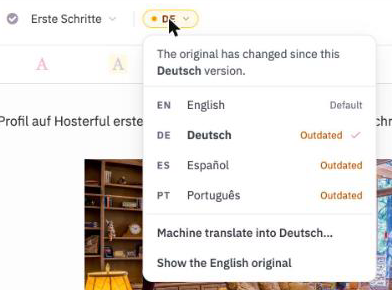
- Review your translation credit total (each article translation uses 1 credit) and click Translate into [language code]
- You're done! Machine translated articles' status will automatically be set to
Complete
Bulk Translate a Single Article
- Head to the article you want to translate in your default language
- Click the language chip (for example EN) in the row under the title
- Click Translate into all languages…
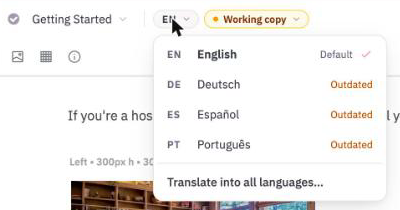
- You'll see all available languages with their current translation status
- Select the languages you'd like to translate into, or click Select all
- Click Translate [number] languages
- You'll get a confirmation for each successfully translated language
Bulk Translating Multiple Articles
- Switch to the language you want to translate into
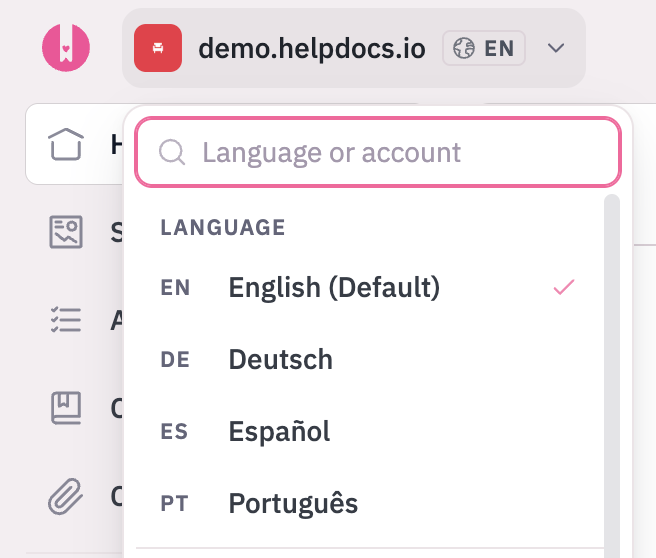
- Select articles with the checkboxes (up to 50 at a time)
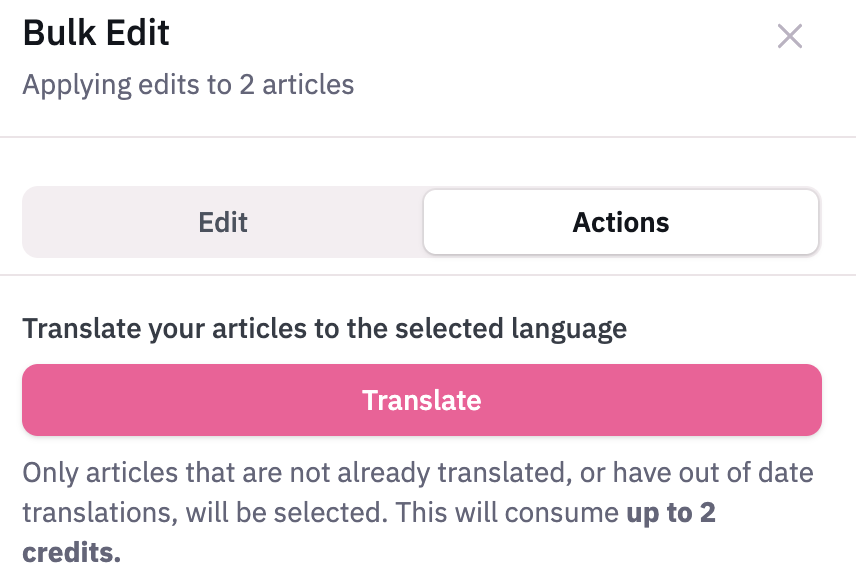
- Click the Bulk edit button in the top right
- Click Actions in the side modal
- Click Translate
Limitations
- Translation count
We'd love to offer unlimited translations but this awesome stuff costs us. Your plan includes a monthly allowance, and you can buy extra credits if you need more translations ✨ - Accuracy
We do our best and employ the latest translation technology but we can't guarantee the content you get back will be 100% accurate - HTML complexity
If your article's really complicated with lots of HTML elements we may struggle to translate it for you. The most common offender here is massive tables. If you encounter this you can split your large elements into smaller ones before translation 🕵️♀️ - Article length
We can translate articles up to 2,500 words ✍️ - Available Languages
We support a lotta languages but not every language