

If you manage two or more Knowledge Bases you'll probably want to switch between them. A lot. That's where the Account Switcher comes in.
The Account Switcher makes it easy to jump between your different Knowledge Bases without having to log out and back in each time. Not seeing an account you expect? Check out Why can't I sign up to a new account I've been invited to?
Don't have multiple accounts yet? Learn how to add another account to your HelpDocs setup
Switching Accounts from the Top Bar
Only accounts you've been invited to and that share your login will appear in this list.
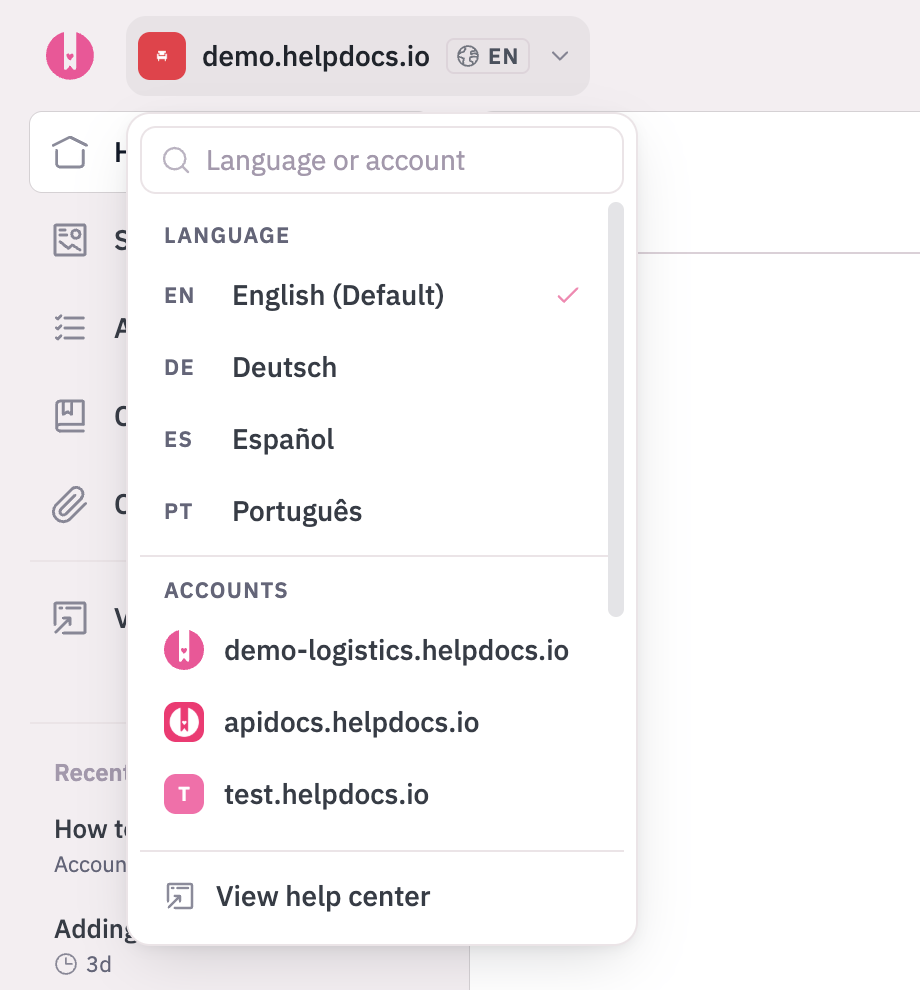
- Click the account switcher in the top left of the top bar. It shows your current account's icon and domain.
- Under Accounts, choose the account you want to switch to. Accounts are listed by domain, with a tick next to the one you're in.
You'll be switched to that account in a few moments.
On a phone, tap the ☰ menu button to find the account switcher.
Switching Accounts from my.helpdocs.io
You can also manage and switch between all your Knowledge Bases from your accounts dashboard. Head to my.helpdocs.io to see all your Knowledge Bases in one place.
From there you can click on any Knowledge Base to jump straight into it.
If you're managing multiple Knowledge Bases for different teams or projects, bookmarking
my.helpdocs.io makes it easy to see everything at a glance.