
Available on: All plans · Help article →
It's crucial your help articles are easy to digest and understand. The old readability gave you a grade number in a tooltip, which was helpful, but it wasn't super actionable.
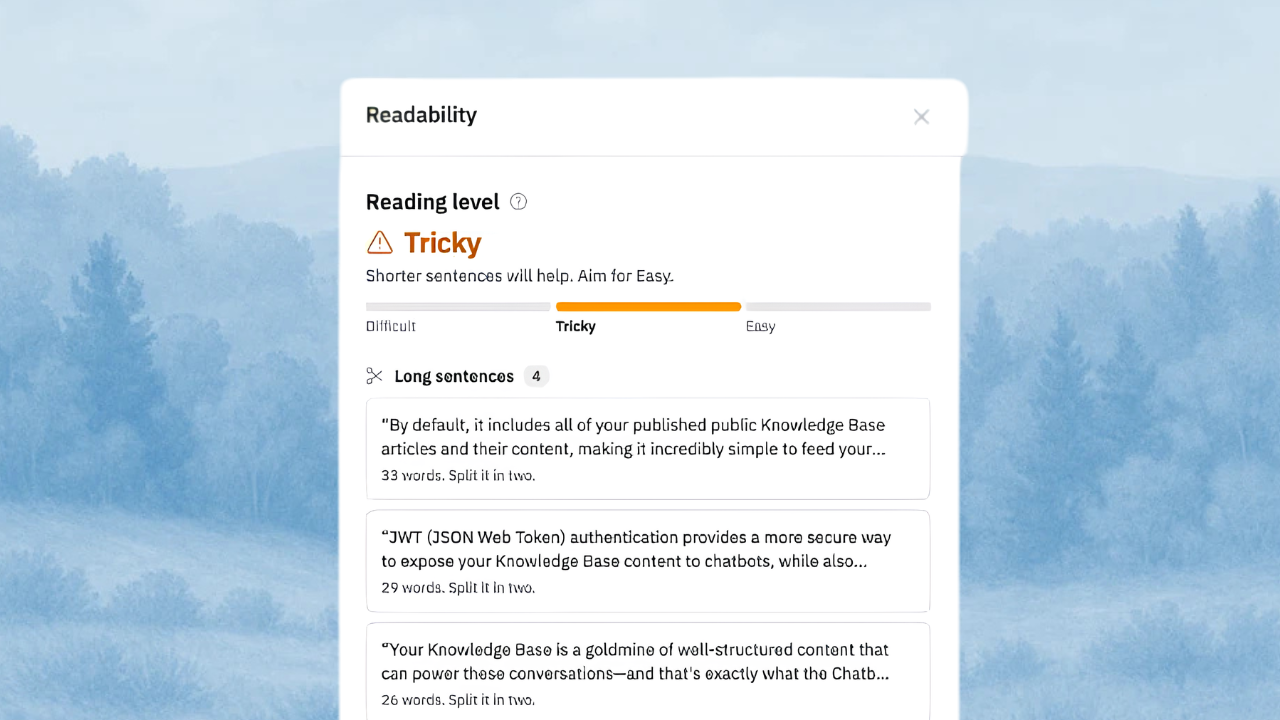
Now we've turned it into its own Readability panel. Just click the  issues button in the readability pill menu.
This gives you a glanceable score, so you can understand where your article could be more digestible with basic fixes like:
Flag | When it's flagged |
|---|---|
| More than 300 words in a row without one. |
| More than 5 sentences, or more than 120 words. |
| More than 25 words. |
| Phrases like "is configured", where it's not clear who does it. English only. |
| Phrases with a shorter option, like "in order to" or "utilize", and words like "simply" that can sound condescending. English only. |
 Needs a heading
 Long paragraphs
 Long sentences
 Passive voice
 Wordy words
In the Classic editor you'll still see the full list, but switch to the Block editor to jump to each issue.
A reading level you can act on
Every article gets one of three levels: Easy, Tricky, or Difficult. Aim for Easy. It's based on how long your sentences are and how many long words you use
A short tip tells you which of the two is holding the article back.
Product names and links shouldn't count against you, so bold text, link text, and inline code are left out of the long word count.
Works in your language
Readability checks each translation in its own language. Long sentences, long paragraphs, and headings are checked in every language. Passive voice and wordy words are English only for now.
German, Dutch, and Finnish naturally use long compound words, so their levels adjust to match. Articles under 100 words, and languages written without spaces (like Chinese, Japanese, and Thai), still get the issue list but no level.