

Working on your Knowledge Base as a team is fantastic. But when multiple people edit articles simultaneously, it can turn into a battle of "last save wins" 🤺
That's why we built real-time Presence indicators into HelpDocs.
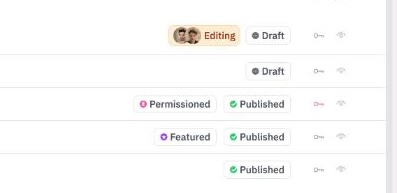
When a team member is editing an article, you'll see an indicator next to that article in the Content view. This gives you a quick overview of what's being worked on across your entire Knowledge Base.
If you open an article that someone else was/is on, you'll see an Editing badge at the top with a presence indicator.
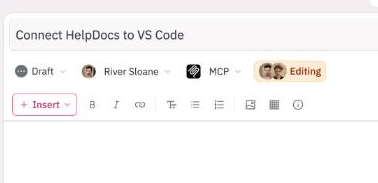
We highly recommend not saving at this point. You'll overwrite your teammate's work and well, not be very popular.
Best Practices for Team Collaboration
Here are some tips to make your team collaboration smooth and conflict-free:
- Check the Content view before starting work to see what's being edited
- Communicate with your team about major article updates
- If you see a presence indicator, wait for your teammate to finish or coordinate directly with them
- Consider working on different sections of your Knowledge Base when possible
Pro tip: Set up a quick team chat or use your project management tool to coordinate who's working on what articles during busy periods