

Readers can type anything into Ask AI. Your team reads those questions in Insights > Ask AI, so kept questions are checked for abuse before anyone has to read them.
How the check works
Questions are checked in the background. Readers still get their answer straight away and nothing slows down.
- The check runs as part of the same regular moderation that covers reader feedback and contact messages.
- Older kept questions are checked too. They are worked through a batch at a time, newest first.
- It doesn't use any AI credits.
- Questions aren't checked if you have switched off AI moderation, or until your data processing agreement is signed or opted out of.
What a flagged question looks like
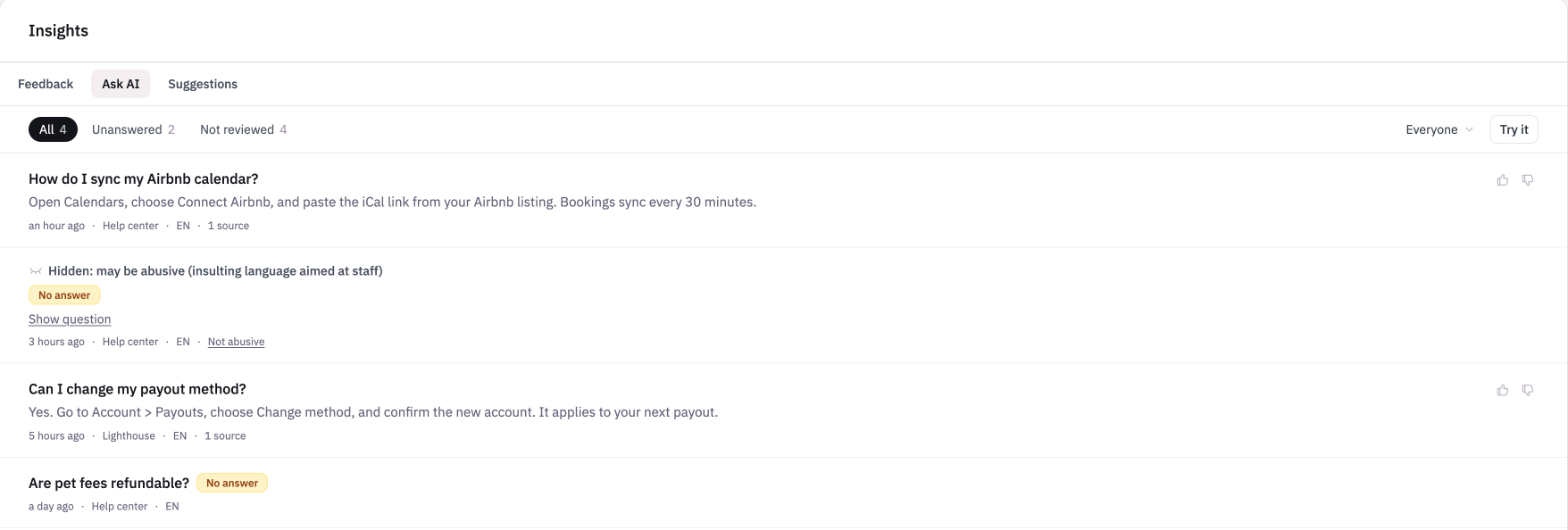
A question that may be abusive is folded away behind Hidden: may be abusive with a short reason. Questions that haven't been checked yet show as they always did.
Only people who can change settings can see the text of a flagged question, reveal it, or mark the flag as wrong. Everyone else sees the flag and the reason, but not the question or its answer.
Click Show question to read it, or Not abusive if the flag is wrong. The question is then shown again and counts toward your content gaps.
What flagged questions affect
Where | What happens |
Totals | Flagged questions still count. |
Search in Insights | Searching never matches the text of a flagged question. |
Gap topics | Flagged questions are left out. |
Examples given to Routines | Flagged questions are left out. |
What the Ask AI tab lists
The tab lists only questions that still have their text, within your analytics window like the rest of Stats. Answers with no kept question still count in your totals.
Routines and unhelpful answers
Routines that read Ask AI gaps also get answers your team marked bad, or that readers marked unhelpful and your team hasn't marked good, along with the articles each answer cited. This uses the same setting as gaps, so there is nothing new to switch on.