

Anonymous Mode lets read-only SSO users access your Knowledge Base without creating HelpDocs user accounts. This keeps them out of your billing and user management while still providing secure access through your identity provider.
It's perfect for teams that want SSO security without the overhead of managing individual user accounts in HelpDocs.
Why Use Anonymous Mode?
Anonymous Mode offers several advantages for teams using SSO:
- Reduced billing: read-only users won't count toward your user limit
- Simplified user management: no need to see or manage these users in HelpDocs Settings
- Permission control: still works with your existing Permission Groups sent from your identity provider
- Secure access: users still authenticate through your SSO but don't create permanent accounts
Requirements
Before enabling Anonymous Mode you'll need:
- An active SAML or OpenID Connect SSO connection
- A HelpDocs plan that includes this feature
- Read-only users authenticating through your identity provider
Enabling Anonymous Mode
Here's how to configure Anonymous Mode for your read-only SSO users:
- Head to Settings > Sign-in & access
- Under Single sign-on find Create accounts for readers
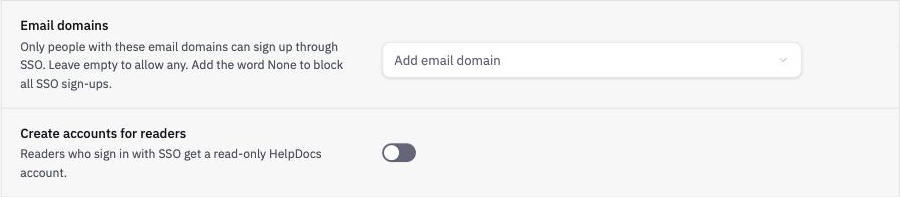
- Turn it off to enable Anonymous Mode
- Click Save changes
When this setting is off, new read-only users who log in through SAML or OpenID Connect won't have HelpDocs user accounts created. When it's on, all SSO users, including read-only ones, will have accounts created.
Important Considerations
Keep these points in mind when using Anonymous Mode:
- This setting applies to both SAML and OpenID Connect if you have both configured
- Users your identity provider sends a higher role for (writer, editor, or admin) will still get HelpDocs accounts created. Your account's Default role doesn't count, so without a role from your identity provider new users sign in as read-only
- This only covers people with no HelpDocs login yet. Anyone who already has one still joins your account as a user when they sign in through SSO, and turning this on doesn't remove your existing read-only users
- Permission Groups from your identity provider will still work for anonymous read-only users
- Anonymous users won't appear in Settings > People